
5 lessons from 2 years of building AI chatbots for businesses
Development
Reading time
5
mins


Two years of building AI chatbots for businesses and we've come a long way.
It all started with chatbots built for our partner Vinify. A wine recommendation assistant, trained on three professional sommelier books, helping users find the right bottle based on their budget, taste, and what was available in the offer.
And an inventory management tool that lets businesses review, update, and remove stock through plain conversation, no traditional interface needed.
We can say the road has been full of adventures, and here's what we learned building productive chatbots so far.
1. What can a chatbot actually improve?
The one constant that appears after deploying AI chatbots is this: they take the repetitive side of customer interaction off your plate.
I wouldn't look at chatbots as something that will replace humans.
It is much more realistic to view them as an additional layer of communication that handles repetitive tasks. As a bonus, they increase customer satisfaction.
In almost every industry, people ask identical questions and look for the exact same valuable information. This is precisely the area where you can start adding value.
With chatbots, you give customers the opportunity to communicate with your company the same way they do with other people. As a bonus, think about how customers would feel if you spared them that irritating music while on hold or waiting days to get a reply by email.
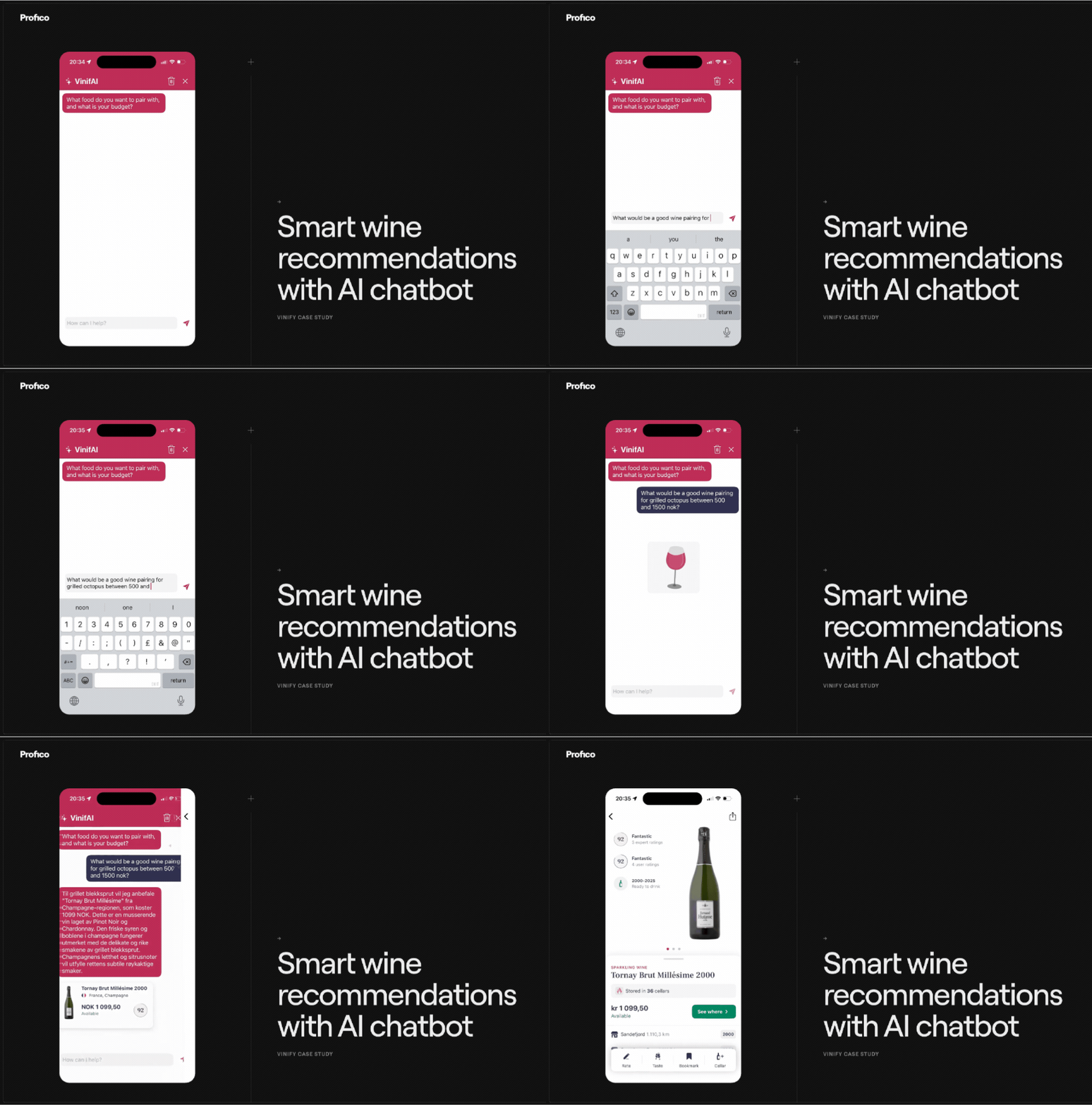
On the flip side, chatbots give your team some time to breathe. Employees can then focus on more complex tasks instead of getting bogged down by the exact same inquiries over and over again.
So, I would say that what a chatbot improves the most is communication speed, availability, and the organization of inquiries.
2. When does it make sense, and when doesn't it?
A practical way to think about it: look at your last 100 support messages.
If the same handful of questions makes up the bulk of them, a chatbot belongs there. Anything with a predictable answer is fair game.
Most businesses are surprised when they do this exercise. A small set of repeating questions typically represents the large majority of total incoming volume. That's the part a chatbot handles well, and it frees up your team for the rest.
The rest is where you keep humans in, especially if someone's inquiry is specific to their situation, emotionally charged, or needs judgment calls.
So the honest line is this: a chatbot does well when the answer is essentially the same regardless of who's asking. When that stops being true, a human needs to be reachable.
What surprised us over time is that this same logic applies beyond customer support.
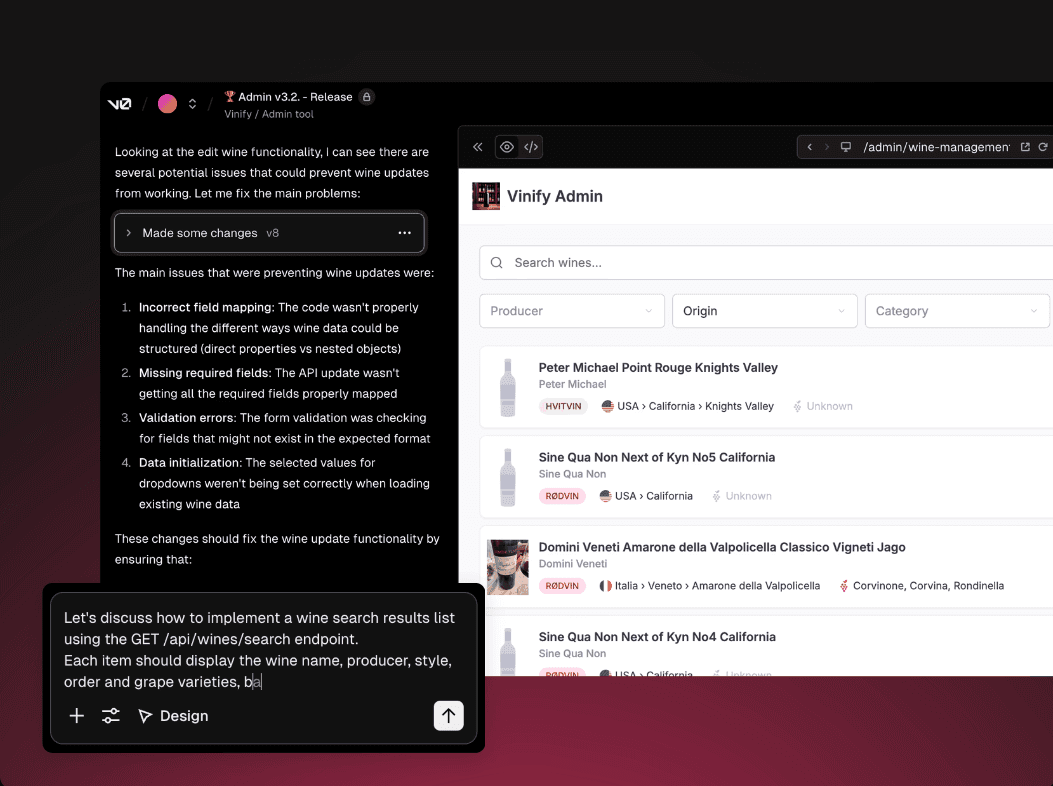
Some of the most useful chat interfaces we built were talking to the people running the business, letting them search records, update entries, and flag duplicates through plain conversation without having to learn a new system.
The range of where a chat interface makes sense turns out to be a lot wider than most people expect.
3. What kind of results can you expect?
It depends heavily on what you built it for and how well it was set up.
But there are patterns worth knowing about.
The most immediate thing businesses notice is obviously the response time.
A chatbot replies instantly, at 2am on a Sunday the same as on a Monday morning.
For a visitor who landed on your site with a question and a short attention span, waiting until the next business day for a human reply is often enough for them to move on.
The second thing that shows up over time is the data.
After a few weeks of conversations, you get a clearer picture of what your users actually want to know, where they get confused, and what your website or sales process isn't explaining well enough. That feedback loop alone is worth something, separate from any automation benefit.
On the cost side, businesses that implement chatbots well typically report around a 30% reduction in customer service costs.
That figure comes up consistently across multiple industry reports, and in our experience it tracks. Once a meaningful portion of your incoming volume gets handled automatically, the savings tend to show up fairly quickly.
What I'd caution against is expecting a chatbot to fix something that's broken for other reasons.
If your product is confusing, a chatbot will surface that confusion faster and at higher volume.
Could be useful, but it's not the same as solving it.
4. How long does it usually take to develop a chatbot like this?
It really depends on the complexity of the chatbot.
If we're building something fairly simple—like a bot that handles FAQs or collects basic user details—it can be wrapped up relatively quickly. In that kind of scenario, we're probably talking about a matter of weeks.
On the other hand, if the chatbot requires more advanced logic, or needs to be integrated with a CRM, booking system, internal databases, or documentation, then naturally, it takes longer.
What people often underestimate is that development isn't just about writing code. A massive chunk of time goes into understanding the underlying processes, crafting the right responses, preparing the content, testing, and getting aligned with the team.
Sometimes the technical side isn't even the biggest hurdle. The real bottleneck is often that the internal information is a mess, or no one is entirely sure what the process is actually supposed to look like.
So, I'd sum it up like this: a basic chatbot can be up and running in a few weeks, while a more complex one could take a month, two, or even longer, depending entirely on how many systems need to be connected and how heavy the business logic is.
5. The most common implementation mistakes that waste time and money
Mistake 1: Trying to build a chatbot that does everything
The single biggest mistake is trying to do way too much all at once.
People often jump in with the mindset of, "Let's build a chatbot that can answer absolutely everything."
It sounds great in theory, but in practice, it usually creates a mess. The scope gets entirely out of hand, it becomes a nightmare to test, the bot fails to provide quality answers, and the user experience takes a massive hit. Starting with a tight scope and crystal-clear goals is what separates a chatbot that works from one that wastes everyone's time.
Mistake 2: No guardrails on what it shouldn't answer
Another major error is failing to clearly define what the chatbot should and shouldn't do. This is especially crucial with AI-powered chatbots. Without strict guardrails, the bot can start spitting out answers that sound incredibly convincing but aren't necessarily accurate.
Mistake 3: Bad source material
The third mistake comes down to poor input. If a chatbot is pulling from internal resources or documentation that is outdated, vague, or contradictory, its answers are going to reflect exactly that.
Mistake 4: No human fallback
A fourth massive pitfall is not providing an escape hatch to a real human. That is incredibly frustrating for users. A chatbot is there to help, but it should never act as a brick wall between your customers and your company.
Mistake 5: Deploying and ignoring it
Finally, the last issue is deploying the chatbot and then completely ignoring it.
The reality is, right after launch is when you gather the absolute best insights. You get to see exactly what people are asking, where they're getting stuck, and what desperately needs tweaking.
In my opinion, the best way to avoid throwing time and money down the drain is to start with a tight scope, set crystal-clear goals, and continuously fine-tune the bot post-launch.
What does it actually look like to work with us on a chatbot implementation?
Our very first step is to sit down with the client and genuinely try to understand the core problem.
We don't just jump straight in with, "You need an AI chatbot."
Maybe you do, maybe you don't. First, we need to figure out exactly where time is being wasted, what your users are asking the most, and what automation could legitimately improve.
Once we have that figured out, we define the initial version together.
This is where being realistic is crucial. It is far better to build a scaled-down version that works flawlessly than a massive one that tries to cover all the bases but ends up doing nothing particularly well.
After we've nailed down a clear scope, we map out the conversational logic, any necessary integrations, and the chatbot's overall tone of voice. From there, we move into development, testing, and finally, the launch.
But I always like to emphasize that the launch is by no means the end of our partnership. Once the chatbot goes live, we monitor how it is being used and continuously fine-tune it based on actual, real-world conversations.
I think that right there is the biggest difference between simply saying "we built a chatbot" and "we built a tool that genuinely helps the business."
A chatbot isn't just a widget sitting on your website. It is a core part of your operations and your customer communication, and it needs to be treated as such.